My New Terminal Environment
A few weeks ago I decided to give my terminal a makeover. Until then I had just been using the default terminal with a default Neovim(vim is the superior text editor) and the default Starship settings. After seeing other peoples very pretty looking terminals I decided to up my game.
The fact that it took me this long to discover the existence of Tmux is truly a shame. Now that I have it I will never go without it. Tmux, or Terminal Multiplexer, allows you to have multiple terminals in one window. You can resize them and move them to your liking, you can even have multiple sessions and switch between them, allowing you to resume your work later. It is amazing. Any developer working under Linux should use it. I can also reload my previous Tmux configurations with the help of some plugins, so I don’t have to manually resize it each time I launch a new session. My current preferred setup is to have one window on the left for whatever I’m doing, a window on the right with Bashtop running to monitor my system, and a window below them both for whatever else I might need to run.
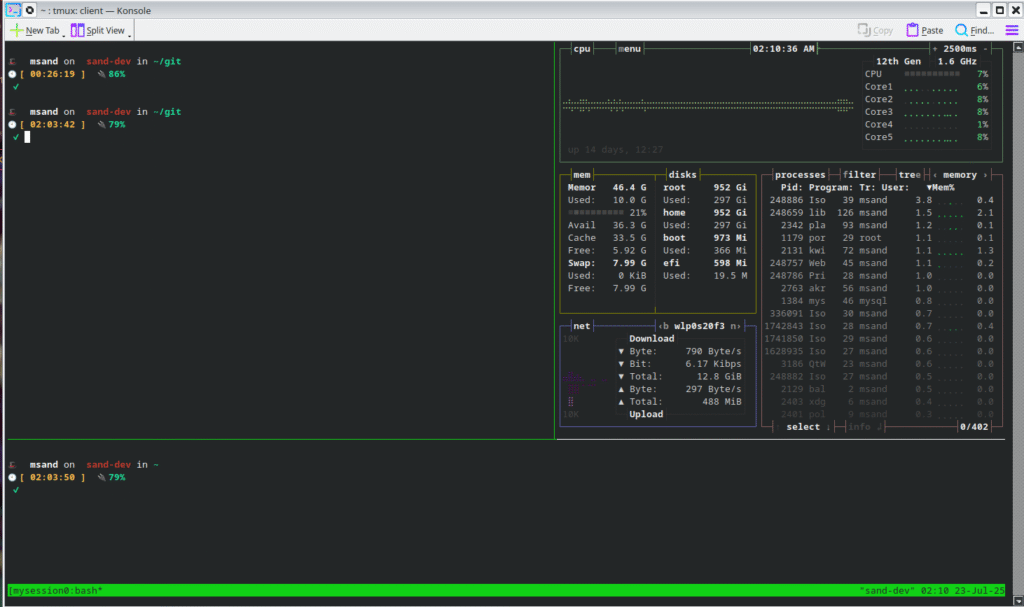
I also spruced up my prompt with the power of Starship. My favorite part now is the little fedora hat at the start for Fedora Linux, it looks so funky! Along with that I added a handful of Neovim plugins using the Lazy.nvim plugin manager.
If you are on Linux and have not yet taken the time to up your terminal game, I seriously recommend it. You can not only greatly produce your productivity but make it significantly more stylish!